
 Ayont
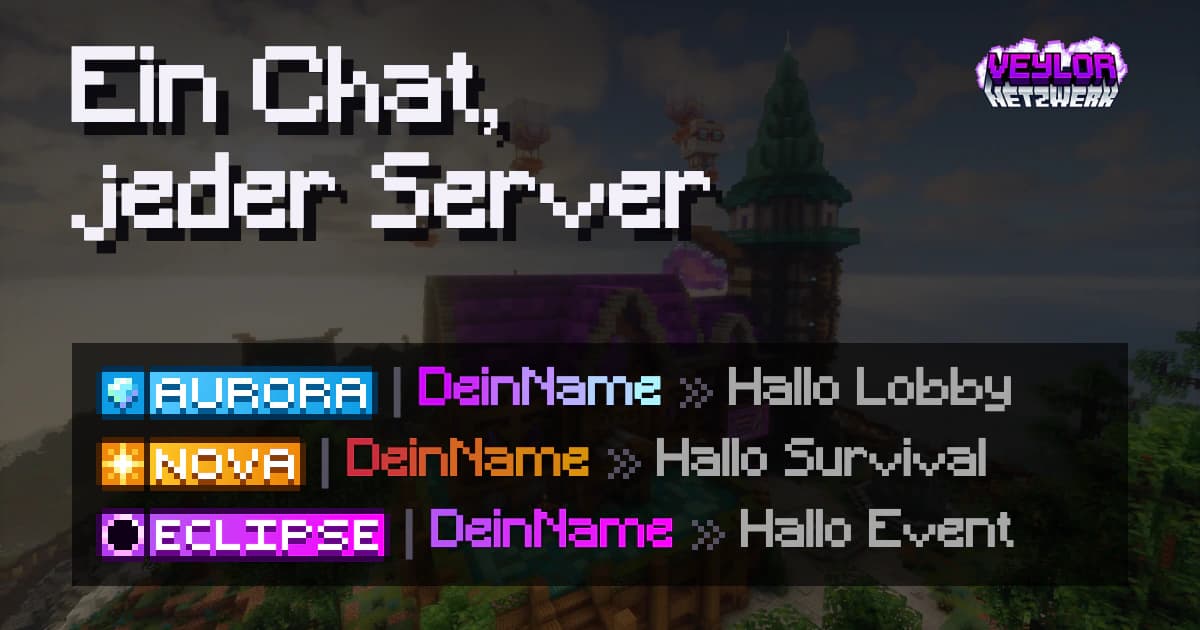
Until now the chat looked different depending on the server. Since November 1st the Survival format applies across the whole network. Your rank and your colors come with you when you switch servers.
This is what a chat line looks like now
Each line is built the same way:
- Clan tag, if you are in a clan
- Rank icon
- Name in your name colour
- Message in your chat colour
The join/leave messages are also now in the Survival format. If you type the name of someone who is currently online, it will be highlighted as @Name.
Rank icons instead of text
Your rank now appears as a small pixel image in front of your name: in chat, on the nameplate above your head, and in the tab list. This lets you see at a glance who has which rank, the same on every server.
Your colours work everywhere
Name and chat keep their colour now even outside Survival.
| Command | What it changes |
|---|---|
/namecolors | The colour of your name |
/chatcolors | The colour of your messages |
Both are set in Survival. Lobby, Event and the SkyBlock test adopt your choice from there, at most after a minute.
You can get colours in the Shop. Enter your name there, and you’ll see it in every colour before buying. Anyone who doesn’t buy a colour chats as before in the default colour of their rank.
Ayont and the Veylor.NET Team