

 Ayont
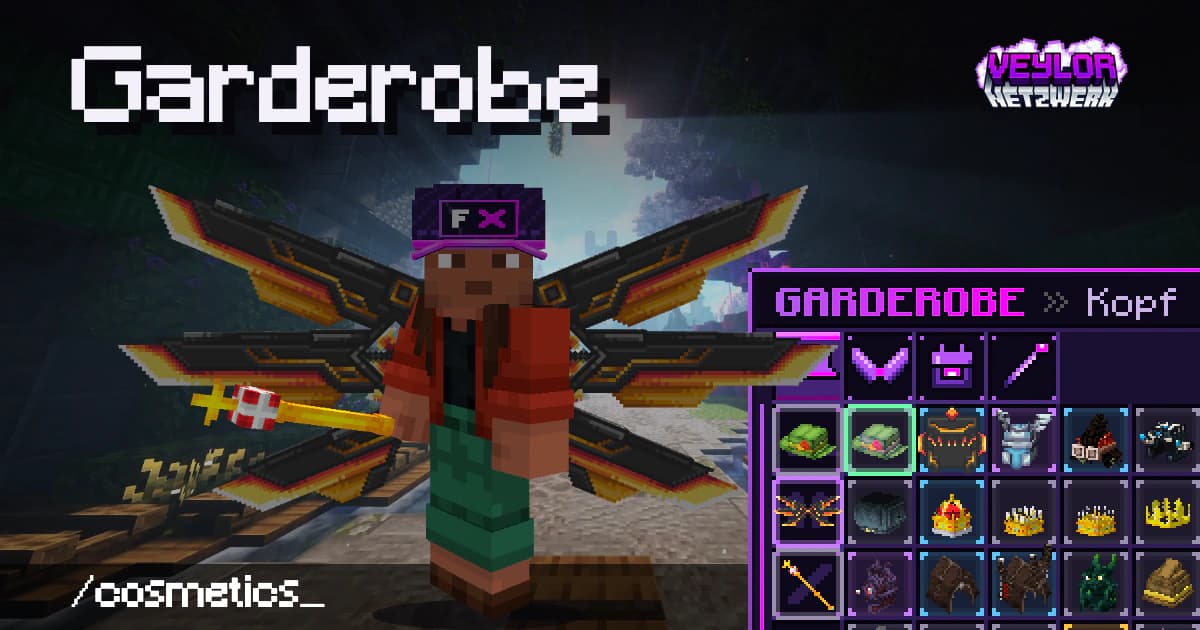
On Veylor you can now wear 3D cosmetics: hats, helmets and crowns on your head, wings and backpacks on your back, skins on your sword. You don’t need a mod or a custom client. Since November 1st your look applies across the whole network.
What makes the wardrobe different
- Your armor stays. A hat sits on top of your actual helmet. Protection and enchantments remain, and the helmet stays visible in your inventory. Wings and back accessories work together with your chestplate.
- Others see your look. Veylor delivers the models via its own resource pack. Anyone who has the pack loaded will see your cosmetics.
- One look for all servers. What you wear on Survival is also visible in the lobby and on the event server. The SkyBlock server in closed testing is also linked.
- It’s purely cosmetic. Cosmetics give no stats and no advantage.
How to open the wardrobe
/cosmetics or /garderobe works on any server.
In the lobby it’s even faster: in the eighth slot of your hotbar there is now a coat rack. Right‑click it and the wardrobe opens.
The menu
At the top you switch between head, wings, back and sword. On the left you always see what you are currently wearing. Clicking there removes the piece.
| Click | What happens |
|---|---|
| Left‑click your piece | Equip or unequip |
| Right‑click a piece | Try it on for 15 seconds, even if you don’t own it |
| Left‑click a locked piece | Shop link for that piece |
| Shift‑click a locked piece | Shop link for the whole set |
In the top‑right the filter can show only your own pieces. Using the eye icon hides everything else, while keeping your selection saved.
The most important commands
| Command | What it does |
|---|---|
/cosmetics list | Shows what you are currently wearing |
/cosmetics off | Unequips everything |
/cosmetics toggle | Toggles visibility on or off, keeping your selection |
/cosmetics equip folienfx-cap | Equips a piece directly |
/cosmetics unequip head | Frees a slot, also works with back or hand |
Sword skins
A sword skin only changes the appearance. It shows while you hold a sword, spear, mace or trident in your main hand. The item itself stays the same. With an empty hand nothing appears, and if you drop the item the skin disappears as well.
How to get pieces
All pieces are available in the Shop. You can try them on your own skin there first. Sets group matching pieces together.
After purchase the pieces stay permanently in your wardrobe. If you’re online, the server will equip a new piece instantly.
Good to know
- Resource pack: Without the Veylor pack you won’t see any cosmetics, neither yours nor others’. If you declined it, reconnect and you’ll be prompted again.
- First‑person view: Hats and wings don’t appear in the camera. You see yourself with F5.
- Bedrock: The models are built for Java and won’t display on Bedrock. In the lobby hotbar a purple tunic replaces the coat rack.
Ayont and the Veylor.NET Team